

'/%3E%3C/svg%3E)


'/%3E%3Cpath%20fill='%23b2b2b2'%20d='M241%20382q0%2016%2017%2026%2017%2011%2042%2011t42-11q16-11%2017-26V269H241'/%3E%3Cpath%20fill='%239f7e00'%20d='M241%20379q0%2014%208%2023%209%209%2021%209%2014%200%2021-9%209-9%209-23V269h-59'/%3E%3Cpath%20d='M241%20339v-70h59v110q0%2014-9%2023l-6%205v-68h-15v72q-8%200-14-4v-68zm59%2040c0%2022%2015%2032%2029%2032%2021%200%2030-18%2030-32v-40h-59'/%3E%3Cpath%20fill='%239f7e00'%20d='M266%20277v5h2v12h-3v-5h2v-5h-9v5h2v5h-4v9h3v18h-5v10h34v-10h-5v-18h3v-9h-4v-5h2v-5h-9v5h2v5h-3v-12h2v-5zm42%20101q0%2010%206%2017%206%206%2015%207%2010-1%2016-7%206-7%206-17v-29h-43'/%3E%3Ccircle%20fill='%230044ad'%20cx='329.5'%20cy='372'%20r='6'/%3E%3Cellipse%20fill='%230044ad'%20cx='300'%20cy='340'%20rx='16'%20ry='21'/%3E%3C/svg%3E)
Spyfall is one of those party games that can turn an ordinary gathering into an evening of suspicious looks, clever questions and unexpected accusations. But what happens if you don’t own the original card game, have forgotten the box at home or want to play with friends online?
Yes, you can play Spyfall without physical cards. All you really need is a way to give players secret information, choose a location and identify one person as the spy. You can achieve this using a website, mobile app, shared smartphone or a simple homemade setup.
The best option depends on how many people are playing, whether everyone is in the same room and what devices you have available.
This guide explains four practical ways to play Spyfall without buying the physical game, including instructions, comparisons and tips for making every round enjoyable.
How Does Spyfall Work Without Cards?

Before choosing a card-free version, it’s useful to understand what the physical cards actually do.
In the original Spyfall, each participant secretly receives a card. Most players see the same location, such as a hospital, restaurant or train station. One player receives a spy card instead and doesn’t know where everyone supposedly is.
During the round, participants ask each other questions to discover who is pretending to know the location.
The spy has a different objective: identify the location without being caught.
Physical cards are simply a way of distributing this information privately. Replace them with digital messages, private screens or another method of assigning roles, and the central gameplay remains the same.
4 Ways to Play Spyfall Without Physical Cards
There are several alternatives to purchasing the original boxed game. Some require nothing more than a web browser, while others involve a little preparation.
1. Play Spyfall Online in Your Browser
Playing through a website is probably the easiest solution if you want to avoid physical cards altogether.
Browser-based adaptations can automatically choose locations, assign spies and manage game sessions.
For example, Spyfall.Live offers browser-based rooms that players can join using a shared code. Other implementations provide a single-device format for people sitting together.
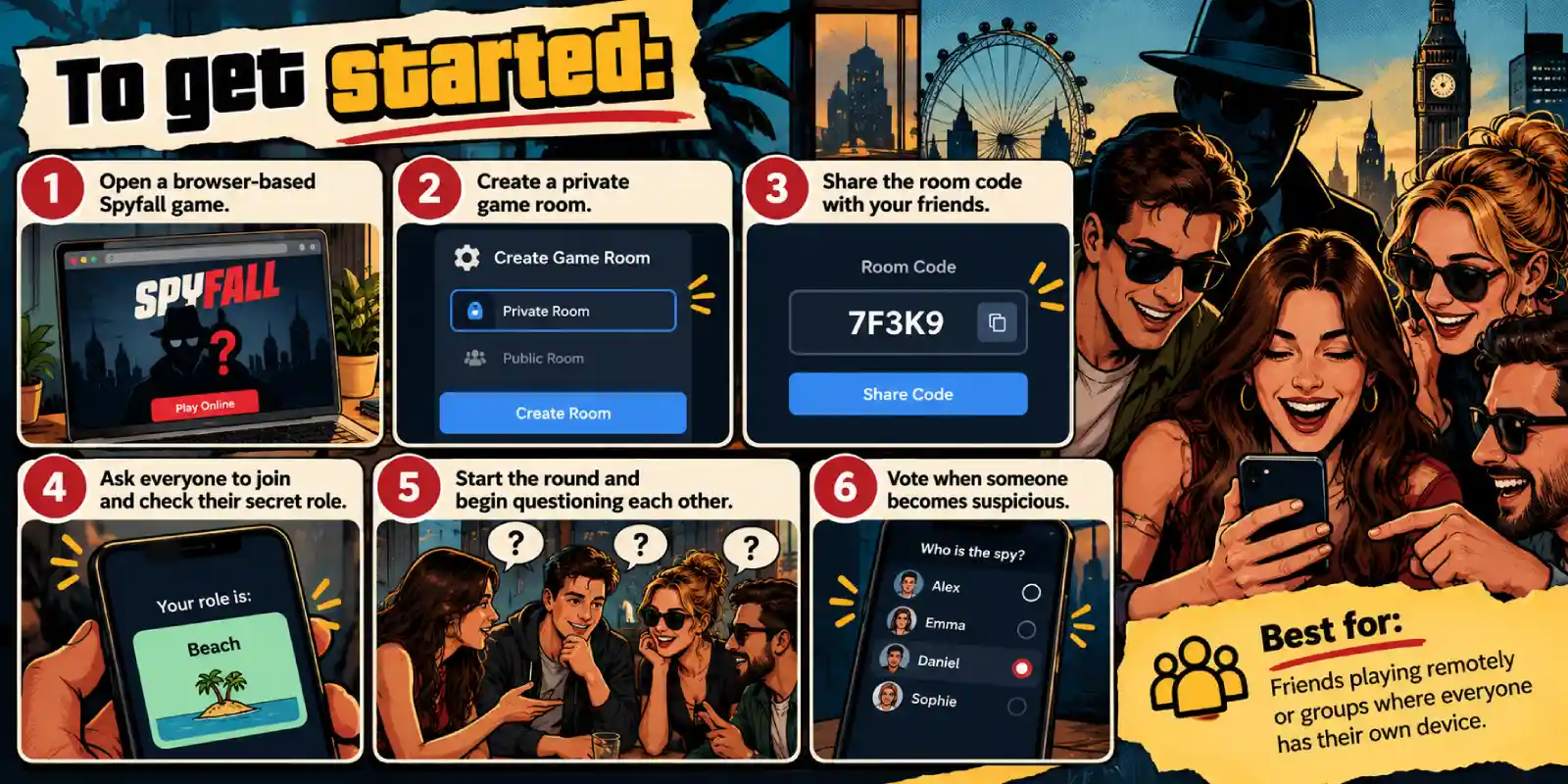
Many browser versions are free, although features, player limits and rules may differ from the original board game. Most are independently developed rather than official digital editions.
2. Play Spyfall Using Just One Phone
You don’t necessarily need a separate device for every participant.
Some mobile-friendly Spyfall games include a pass-and-play mode that allows everyone to share one smartphone.
Each player privately views their role before passing the phone to the next person.
For example, the browser-based Spyfall game at Find the Imposter offers a shared-phone mode with private role reveals.
The process is straightforward:
- Enter the number of participants.
- Choose the available locations or a theme.
- Give the phone to the first player.
- Let them privately reveal their role.
- Hide the information before passing the device along.
- Begin the round once everyone has checked their role.
The important part is ensuring that nobody accidentally sees another participant’s information.
Best for: Family games nights, university gatherings and spontaneous parties.
A dedicated pass-and-play game is safer than displaying roles in an ordinary notes app, where players might accidentally see the entire assignment list.
3. Use a Spyfall Mobile App
Another convenient option is downloading a mobile game inspired by Spyfall.
Dedicated apps can simplify the process by handling role assignments, timers and scoring.
Depending on the application, features may include:
- Automatically assigned spies and locations.
- Customisable round lengths.
- Multiple location collections.
- Offline gameplay.
- Support for larger groups.
- Built-in voting and scoring.
For instance, the iOS application SpyFall: Find the Spy offers a single-device mode and custom location sets.
Not every app supports the same features, and some limit player numbers or charge for additional content.
Check its current description before downloading, especially if you’re organising a large gathering.
Best for: Regular players who want a convenient experience without repeatedly setting up browser sessions.
4. Create a DIY Spyfall Game
If you prefer not to use a dedicated Spyfall website or app, you can organise your own version.
You’ll need a location list, a timer and a reliable way of assigning secret information.
The simplest method uses a non-playing organiser.
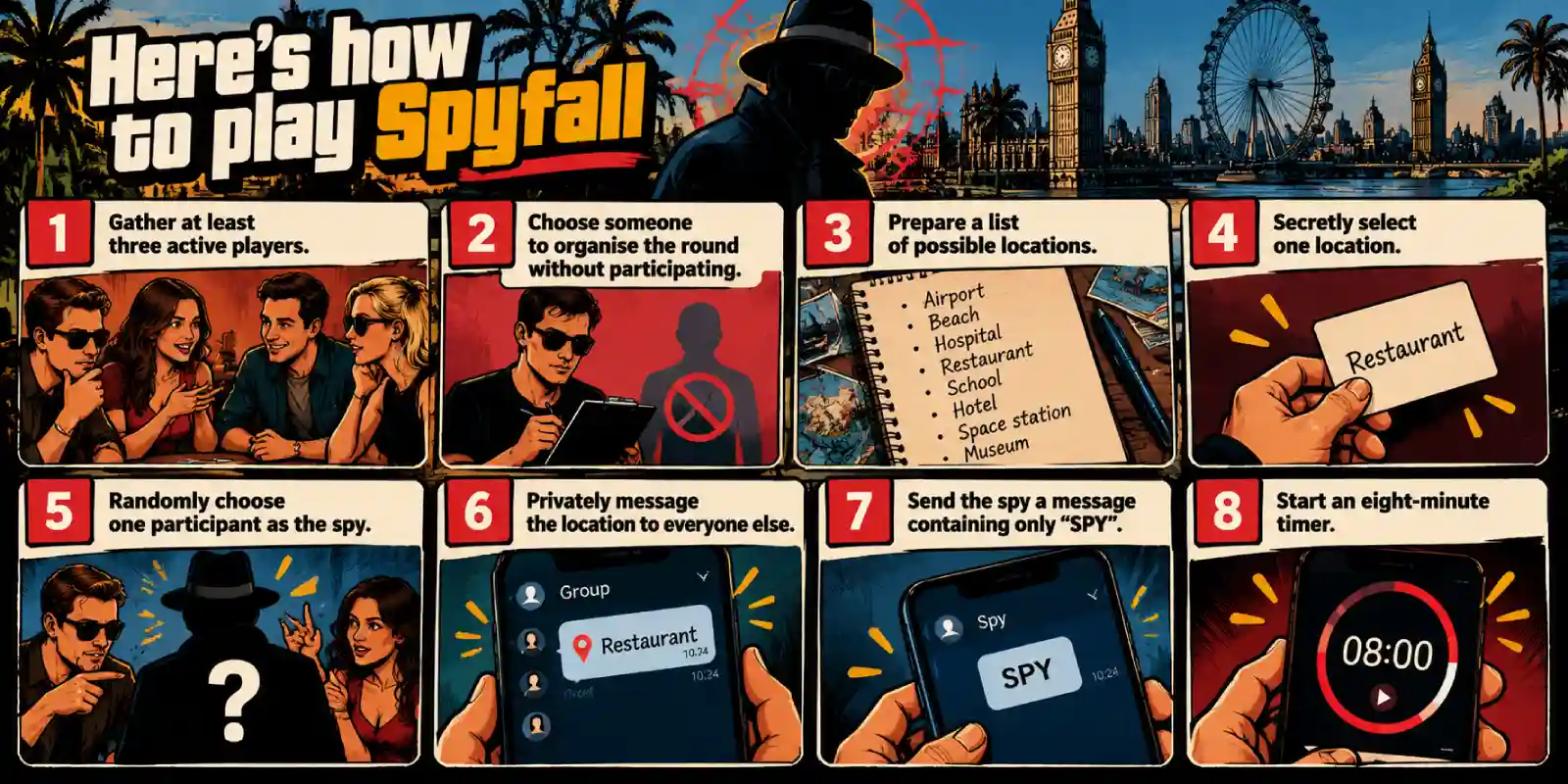
Once everyone has received their information, begin asking questions.
You can distribute roles through WhatsApp, Signal or another private messaging service.
For a fair game, the organiser should normally sit out the round because they know who the spy is. Alternatively, use a neutral digital role generator that hides assignments from everyone.
If you have paper available, homemade folded slips can also replace the original cards.
Best for: Creative groups who enjoy customising locations and creating their own rules.
Which Card-Free Spyfall Method Is Best?
Each approach offers slightly different advantages. Your choice should depend on the equipment available and the number of participants.
| Method | Equipment needed | Internet required? | Best for |
|---|---|---|---|
| Browser game | Phones or computers | Usually yes | Remote groups |
| One-phone mode | One smartphone | Depends on the tool | In-person gatherings |
| Mobile app | Compatible smartphone | Not always | Regular games nights |
| DIY messaging | Messaging devices and timer | Usually yes | Custom games |
| Homemade paper slips | Paper and pen | No | Completely offline play |
For most groups, a browser-based game is the easiest starting point because it eliminates almost all preparation.
However, if you’re playing somewhere with unreliable mobile reception, an offline-capable app or homemade paper version may be more practical.
How to Play Spyfall Without Cards: Basic Rules
Whether you’re using a smartphone or handwritten role assignments, the fundamental rules remain familiar.
The original Spyfall supports 3–8 players, with standard rounds lasting eight minutes.
Step 1: Assign Secret Roles
Everyone except the spy receives the same location.
The spy knows their identity but must discover the secret setting through conversation.
Step 2: Ask Questions
One participant asks another a question about the location.
For example:
“Would you usually visit this place at weekends?”
The person answers, then directs a new question towards someone else.
Under the original rules, they cannot immediately question the player who just questioned them.
Step 3: Identify Suspicious Answers
Players should listen carefully for responses that seem inconsistent, unnecessarily vague or unusually specific.
Someone who genuinely knows the location should be able to demonstrate that knowledge without revealing too much.
Step 4: Accuse the Spy
Players can make accusations during the round.
Under the standard rules, an accusation requires unanimous agreement to reveal the suspected player’s identity.
Some online adaptations use majority voting instead, so agree on the rules beforehand.
Step 5: Guess the Location
The spy can reveal themselves and attempt to name the location.
A correct guess wins the round for the spy. An incorrect guess gives the other players victory.
If the timer expires, follow the agreed final accusation procedure rather than automatically declaring a winner.
Best Locations for Playing Spyfall Without Cards
One advantage of creating your own Spyfall game is the freedom to choose locations.
Instead of being restricted to the original deck, you can select familiar places or build themed collections.
Here are some ideas particularly suitable for UK games nights.
| Category | Location ideas |
|---|---|
| Everyday places | Supermarket, library, hospital |
| Travel | Railway station, airport, ferry terminal |
| Entertainment | Cinema, football stadium, theatre |
| British favourites | Pub, seaside pier, village fête |
| Unusual locations | Submarine, castle, space station |
For beginners, familiar settings are usually easier to understand and discuss.
Experienced groups may prefer unusual locations because they encourage more imaginative questions.
A useful tip is to make the complete list of possible locations available to everyone, including the spy, while keeping the chosen location secret. This mirrors an important part of the original game’s design and makes guesses more interesting.
How to Ask Better Questions in Digital Spyfall
Removing the physical cards doesn’t change the most important skill: asking questions that reveal knowledge without revealing the answer.
Suppose your secret location is a railway station.
Consider the following examples:
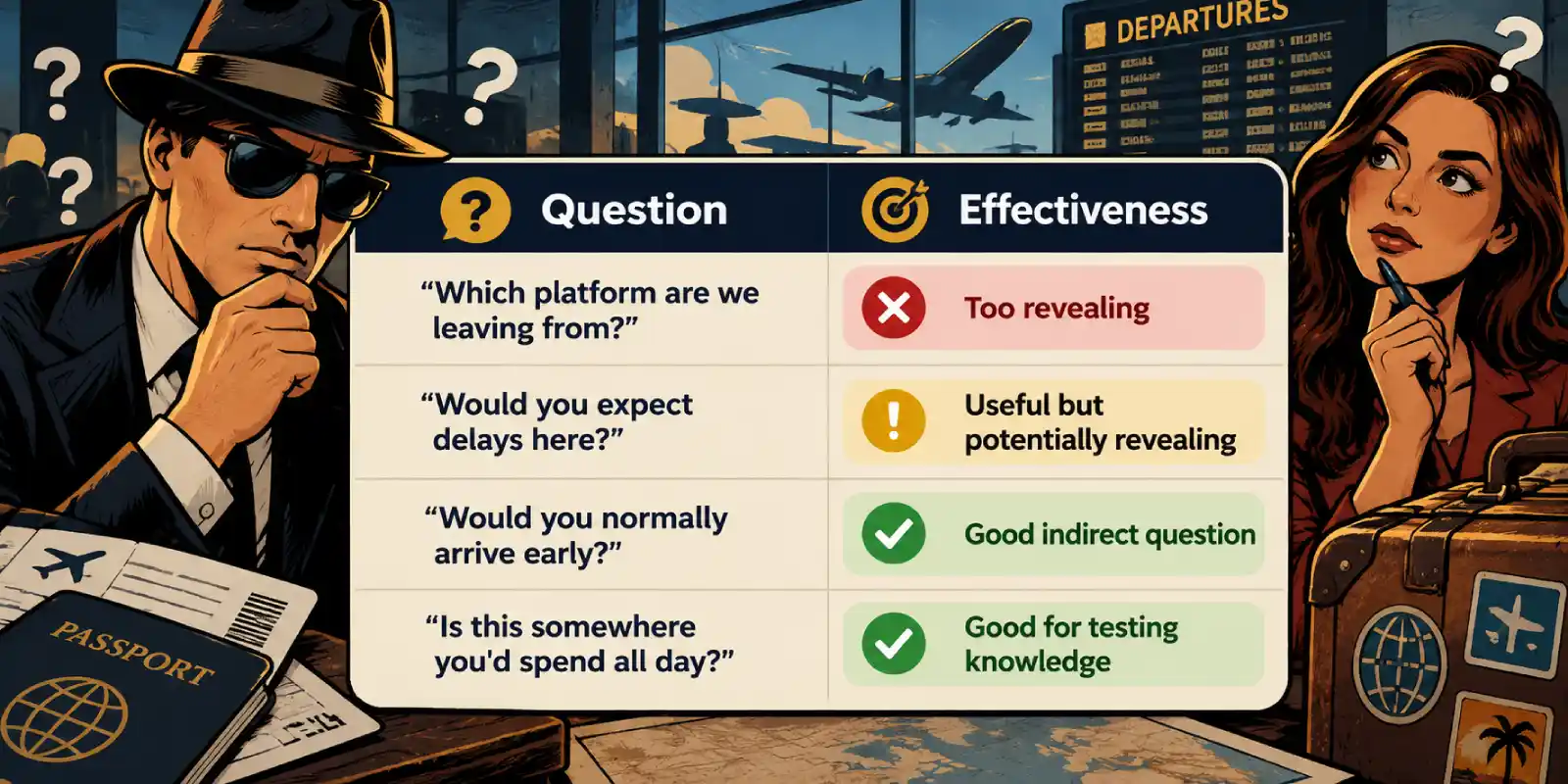
The best questions require players to demonstrate familiarity with the setting while leaving several possible interpretations.
Avoid asking a series of questions about the same obvious feature. The spy may be able to identify the location simply by combining the clues.
Common Mistakes When Playing Spyfall Without Cards
Digital and homemade versions are convenient, but a few avoidable mistakes can spoil a round.
Accidentally revealing the location: Keep private messages away from shared screens and avoid announcing the location before everyone has received their role.
Choosing an unfair organiser: If someone manually assigns spies and also participates, they already know too much. Use a non-playing organiser or an impartial role generator.
Using overly difficult locations: Start with familiar settings, particularly when introducing younger or inexperienced participants.
Ignoring the timer: Without a time limit, conversations may become repetitive and the spy can gather too much information.
Changing rules unexpectedly: Explain voting, spy guesses and scoring before the game starts.
For online sessions, ask participants to keep their microphones unmuted when speaking and ensure everyone can hear the full conversation.
Final Verdict: Is Spyfall Worth Playing Without Physical Cards?
Absolutely. The excitement of Spyfall comes from the conversations, convincing bluffs and unexpected discoveries rather than the physical cards themselves.
A browser-based version is ideal for quick games with friends, while a single-phone setup works particularly well for in-person gatherings. Mobile apps offer additional convenience, and homemade versions give you complete control over the locations and rules.
For the most enjoyable experience, start with five or six players, choose familiar locations and use an eight-minute timer.
As long as everyone’s role remains secret and the group understands the rules, you can enjoy the essential Spyfall experience without ever opening a box of cards.
Frequently Asked Questions About Playing Spyfall Without Cards
Can You Play Spyfall for Free Without Buying the Game?
Yes. Several independent browser-based adaptations allow groups to play without purchasing the physical game. You can also create a homemade version using a location list and private role assignments.
Can You Play Spyfall Without Downloading Anything?
Yes. Browser-based games work directly on compatible phones, tablets and computers. Some also allow players to join private rooms without creating accounts.
Can You Play Spyfall on Zoom or Discord?
Yes. Use a browser game to distribute secret roles, then conduct the conversation through Zoom, Discord or another voice communication service. Make sure private role information isn’t visible through screen sharing.
Can You Play Spyfall Without Internet?
Yes, provided you have another way to distribute roles. Homemade paper slips work particularly well, while some dedicated apps support offline play.
Can You Play Spyfall With Only Two People?
The original Spyfall is designed for at least three participants. However, Spyfall: Time Travel includes a dedicated two-player option, and modified guessing games can work for couples.
Is Digital Spyfall the Same as the Board Game?
The central concept is usually similar, but individual websites and apps may introduce alternative voting systems, different player limits, additional spies or custom locations. Always check the specific version’s instructions.
Do You Need a Separate Phone for Every Player?
No. Pass-and-play versions allow everyone to use a single phone, provided each person can view their role privately.

Born and raised in London, Paul is the Digital Strategist and Content Manager. With a strong background in multilingual content creation, he works behind the scenes to ensure players worldwide have a seamless, engaging experience while hunting down spies. When he isn’t optimizing website content or testing new web features, you can usually find Paul training at his local MMA and boxing gym, or putting his own social deduction skills to the test in a fast-paced round of our social deduction game.